The Freshworks Developer MCP server provides a standardized interface for managing the app lifecycle and submissions. Currently, it is being used by the fw-publish skill to enable AI assistants to interact securely with the Developer Portal to automate discovery, status tracking, and package uploads.
Overview of architecture
The Developer MCP server works in the following way:
- The MCP client (such as Cursor, Claude, or GitHub Copilot) includes an AI agent powered by a large language model (LLM).
- The AI agent communicates with the Developer MCP server using the Model Context Protocol (MCP).
- The MCP server then interacts with internal tools through APIs to provide Freshworks-specific assistance.
The following diagram illustrates how the MCP server integrates with your development environment.
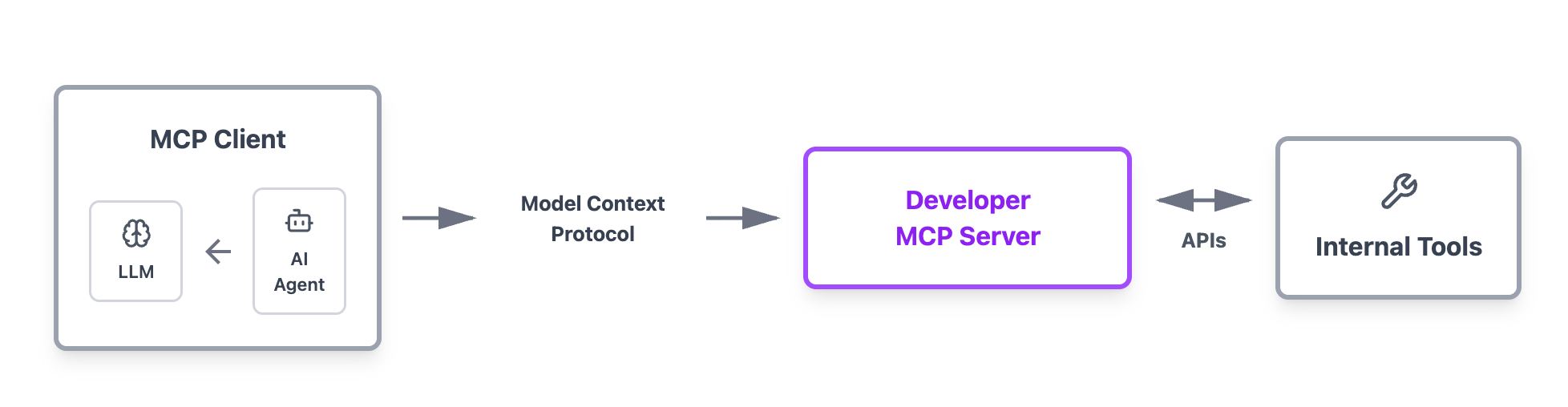 Developer MCP server architecture
Set up Developer MCP server
This section describes how to connect your code with the Developer MCP server.
Prerequisites
Before you begin, make sure you have the following:
- An active Freshworks Developer Account, if you don't already have one, Sign Up to create a new account
- FDK version 9.1.0 or later. We recommend using the latest version of the FDK
- A working understanding of the Model Context Protocol (MCP)
- Familiarity with MCP clients, such as Cursor, Visual Studio Code, or other MCP-compatible tools
Create and set up the MCP JSON configuration
Follow the steps below to create and set up the MCP JSON configuration required for connecting to the server:
- Go to the Application Management Portal (AMP) and click the Settings icon in the top-right corner.
- Under the API key for Freddy AI Copilot VS Code plugin & Agentic Developer Toolkit section, click Generate API Key or View API Key.
- The API key is displayed.
- Add the following details to the MCP configuration file of your preferred AI assistant:
- Name: fw-dev-mcp
- URL: https://mcp.freshworks.dev/mcp
- Authorization header: Your Developer API key obtained from the Application Management Portal.
Sample MCP JSON configuration code
{
  "mcpServers": {
    "fw-dev-mcp": {
      "url": "https://mcp.freshworks.dev/mcp",
      "headers": {
        "Authorization": "Bearer <your-api-key>"
      }
    }
  }
}
Once the MCP server is set up, the tools listed in the Available tools section are available for the AI assistant to use.
Rate limits
Requests to the Developer MCP server are limited to 60 requests per minute.
List of available tools
The Developer MCP server provides a set of tools to automate the Custom app submission process.
The following table lists each MCP tool and what it does.
| Tool | Purpose |
|---|---|
| list_custom_apps | Retrieves a list of all custom apps, including their ID, name, state, and latest version. |
| list_app_versions | Lists all versions for a specific app. |
| create_app_upload_url | Generates a presigned S3 upload URL. |
| submit_custom_app | Creates a new app entry and uploads its initial version. |
| add_app_version | Adds a new version to an existing app. |
| get_app_status | Retrieves the latest status for a specific app using its identifier. |